 CAGED MAP
See your target notes.
C · E · G
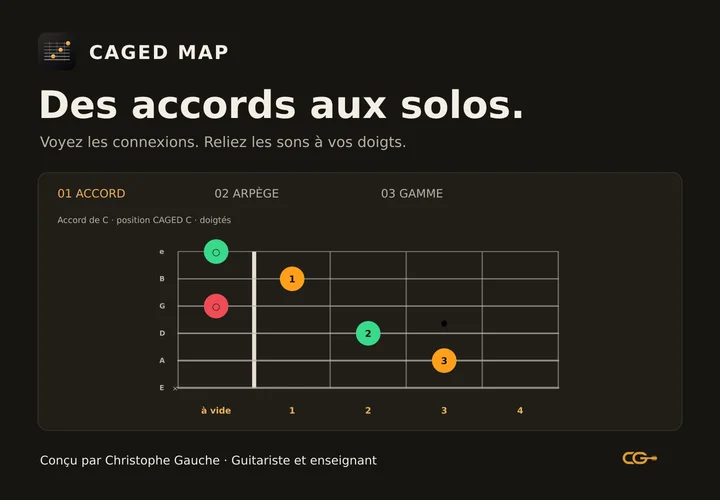
A C major chord contains these three notes. Find them on the fretboard and hear how they sound.
You know some scales.
But which notes should you play over a chord?
Find the chord tones inside your scale. Hear them and locate them under your fingers to build your own phrases, with fingerings shaped by a guitarist.
Try it free, with no account.
The CAGED system uses five chord shapes: C, A, G, E and D. CAGED Map helps you find their notes in arpeggios and scales, with fingerings shaped for guitar playing.
Choose a position, compare the chord, its arpeggio and the scale, then listen and play. Build reference points for choosing notes in your solos. The free demo begins with C, F and G in C major.
Try CAGED MapKnowing which notes belong to a chord does not yet tell you how to play them comfortably on guitar.
CAGED Map connects musical relationships to positions and fingerings worked out by a guitarist: finger placement, open strings, open positions and movement along the fretboard.
Notes and intervals can be calculated. Fingerings require practical decisions about how the instrument is played. That pedagogical work guides your exploration.
Connect what you see, what you hear and what you play.
When you run through a scale without knowing where to land, chord tones can become your targets. CAGED Map shows them in the same part of the fretboard.
A C major chord contains these three notes. Find them on the fretboard and hear how they sound.
An arpeggio plays chord tones one at a time. See where to find them as you build a phrase.
The scale gives you more options. Find passing notes while keeping track of your chord-tone targets.
C, F and G · C major
CAGED shapes C and A · triads
Choose a chord, move to its arpeggio and then the scale. Turn on Understand to follow the explanations. Tap the fretboard to hear the notes.
Other settings remain visible so you can see what the full version offers.
Sound starts after you interact.
On a phone, turn to landscape for a wider fretboard.
Compare chord, arpeggio and scale in the same position. The note colours help you follow their roles.
Fingerings help you play a position. Note names and intervals help you understand what you hear and recognise the same relationships elsewhere.
Keep explanations nearby in Understand mode, then return to a simpler view to explore and practise.
Pricing and terms are shown at checkout.
The app and introductory guidance are currently in French.
CAGED Map is evolving: positions and fingerings are reviewed and corrected progressively.
Start with a few notes and a short phrase. In the demo, choose C, find C, E and G, then locate them in the arpeggio and the C major scale. Play slowly, vary the rhythm and leave space. Aim for a phrase you like hearing rather than covering every fret.
Chord tones give you useful targets. Over C major, they are C, E and G. Use them to begin or end a phrase, then explore the other notes in a scale that suits the song. Rhythm, note length and accompaniment also affect what you hear.
A chord combines notes played together. An arpeggio plays chord tones one by one. A scale organises notes that can form melodies and chords. In the C major demo, the C chord and its arpeggio share C, E and G; the scale also contains D, F, A and B.
In a C major progression, the C major scale contains the notes of all three chords: C = C, E, G; F = F, A, C; G = G, B, D. CAGED Map Lite lets you compare them in one fretboard area. Targeting the active chord tones helps you hear the changes.
No. Fingerings show where to place your fingers; the Notes and Intervals views help you name and understand what you play. Knowing a few guitar chords makes it easier to begin.
The CAGED system uses five chord shapes: C, A, G, E and D. They connect chord, arpeggio and scale positions on the fretboard. In CAGED Map, you explore those relationships one area at a time.
Yes, if you already know a few guitar basics. Start with the three Lite chords and Understand mode. The app shows the connections; turning them into music takes playing, listening and practice.
A theoretical map shows where notes occur. A fingering proposes a way to play them. CAGED Map uses guitar-based choices of shapes and fingers, including open strings and open positions. These data are progressively checked and corrected.
No. You can start by comparing the chord, arpeggio and scale in one position. The explanations help you make sense of what you see.
It is a visual and audio tool for finding your bearings, not a complete course. Rhythm, phrasing, listening and playing songs remain essential.
The full version works in a browser and can be added to your Home Screen. On iPhone, open the link in Safari, tap Share (sometimes under the ellipsis menu), then Add to Home Screen. Labels and placement depend on your Safari version. Landscape gives you a wider fretboard.
Keep your internet connection on for the first download until the app confirms offline availability. Offline use depends on your browser retaining the data; if you clear it, download again. Updates are retrieved when you open the app online.
You receive an access PDF with the link to the full app and instructions to open and install it. If you need help, contact me at contact@christophegauche.com.
Start with C, F and G. See what connects them.